This post is also published in blog.saeloun.com.
What is Passwordless authentication?
Passwordless authentication is an authentication method that verifies users identity and grant access to a site or system without using password. Instead, users can authenticate using methods like:
- Biometrics: Face ID, Touch ID
- Hardware tokens: Devices like YubiKeys
- Digital tokens: Generated by authenticator apps
- Magic links: Sent to the user’s email
This method enhances security and simplifies the login process by eliminating password vulnerabilities.
What is WebAuthn?
WebAuthn (Web Authentication API) is a W3C and FIDO standard that provides strong, passwordless authentication using public-key cryptography. It replaces passwords and SMS-based methods with secure, user-friendly solutions.
How Does WebAuthn Work?
- Public Key Generation (Registration):
During registration, the authenticator generates a public-private key pair. The public key is sent to the server and stored, while the private key stays securely on the authenticator.
- Private Key Usage (Authentication):
During authentication, the server sends a challenge to the user. The authenticator uses the private key to sign the challenge, proving ownership of the private key.
- Validation:
The server uses the previously stored public key to verify the signed challenge. If the signature matches, authentication is successful.
The private key never leaves the authenticator, ensuring security.
Benefits of WebAuthn:
- Protection against phishing attacks
WebAuthn links the authentication process to the website’s origin, preventing attackers from using fake websites to steal credentials.
- Impact of Data Breaches:
Servers only store public keys. Even if compromised, attackers cannot authenticate without the corresponding private key.
- Simplified Login Experience:
Users no longer need to remember or store passwords. This reduces reliance on password managers and mitigates risks of reused passwords.
Limitations of WebAuthn:
- Lost authenticators:
If user lost the authentication device then they would not be able to gain access to the system, and binding the existing account with new passkey will be difficult.
- Browser and device compatibility:
While most modern browsers support WebAuthn, some platform-specific limitations exist. For example, Touch ID or Windows Hello may not work cross-platform.
WebAuthn implementation:
In Rails application, implementing passwordless authentication can be achieved seamlessly using the webauthn-ruby gem for backend integration and webauthn-json for frontend handling. These tools simplify the process of incorporating WebAuthn standards into our application.
To follow along, clone the webauthn-rails-demo-app for reference.
1) Setup
Install Required Libraries:
Add the webauthn-ruby gem in Gemfile:
gem "webauthn"Install the webauthn-json library for frontend operations:
yarn add @github/webauthn-jsonConfiguration:
Create an initializer to configure WebAuthn:
# config/initializers/webauthn.rb

WebAuthn.configure do |config|
  # Ensure this matches the URL where app is hosted
  config.origin = Rails.configuration.webauthn_origin

  # Relying Party name for display purposes
  config.rp_name = "WebAuthn Rails Demo App"
endoriginensures authentication requests come from the apprp_namethe name shown to users during authentication.
2) User Registration
During registration, the app creates a public-private key pair, storing only the public key.
Backend: Generate Registration Options
The backend generates WebAuthn options for the frontend to create a public-private key pair.
# app/controllers/registrations_controller.rb

def create
  user = User.new(username: params[:registration][:username])

  create_options = WebAuthn::Credential.options_for_create(
    user: { name: user.username, id: user.webauthn_id },
    authenticator_selection: { user_verification: "required" }
  )

  session[:current_registration] = {
    challenge: create_options.challenge,
    user_attributes: user.attributes
  }

  render json: create_options
end- A create action request from the frontend with the username is received.
- Generates WebAuthn registration options including a challenge and user details.
- Temporarily stores the challenge and user attributes in the session.
Frontend: Register Credential
The frontend creates a WebAuthn credential using the options from the backend.
// app/javascript/credential.js

function create(callbackUrl, credentialOptions) {
  WebAuthnJSON.create({ publicKey: credentialOptions })
    .then((credential) => {
      fetch(callbackUrl, {
        method: "POST",
        headers: { "Content-Type": "application/json" },
        body: JSON.stringify(credential),
      });
    })
    .catch((error) => {
      console.error("Registration failed", error);
    });
}
The browser (Chrome) prompts the user to create a WebAuthn credential, offering two options for authentication: using a Smartphone/Security key or their passkey tied to the Chrome profile.
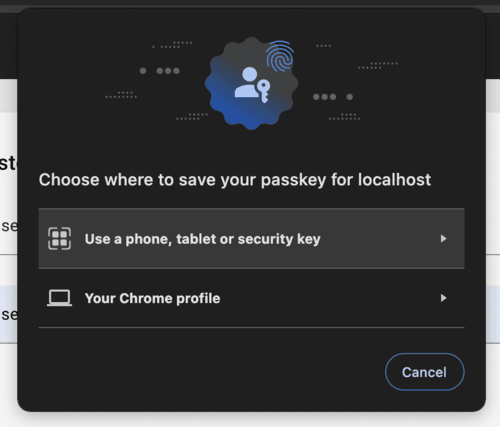
Choosing the “Use a phone, tablet or security key” option will display a QR code, allowing the user to generate a passkey using phone biometrics. Alternatively, YubiKeys can also be used to generate the WebAuthn credential.
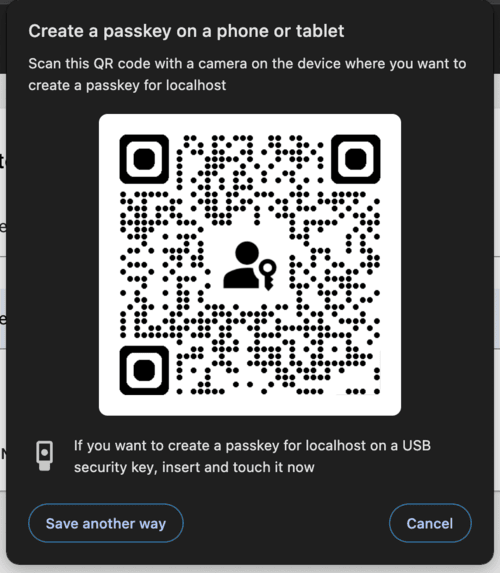
After the user completes the action, the generated credential is sent to the backend for verification.
Backend: Verify Registration
The backend verifies the public key credential sent by the frontend.
# app/controllers/registrations_controller.rb

def callback
  webauthn_credential = WebAuthn::Credential.from_create(params)
  user = User.new(session[:current_registration]["user_attributes"])

  webauthn_credential.verify(session[:current_registration]["challenge"])

  user.credentials.build(
    external_id: Base64.strict_encode64(webauthn_credential.raw_id),
    nickname: params[:credential_nickname],
    public_key: webauthn_credential.public_key,
    sign_count: webauthn_credential.sign_count
  )

  if user.save
    sign_in(user)
    render json: { status: "ok" }
  else
    render json: { error: "Registration failed" }, status: :unprocessable_entity
  end
end- Verifies the challenge using the WebAuthn gem.
- Saves the credential’s public key, nickname, and metadata in the database.
- Signs the user in if registration is successful.
3) User Authentication:
Backend: Generate Authentication Options
The backend sends a challenge and existing credentials for the user to authenticate.
# app/controllers/sessions_controller.rb

def create
  user = User.find_by(username: session_params[:username])

  get_options = WebAuthn::Credential.options_for_get(
    allow: user.credentials.pluck(:external_id),
    user_verification: "required"
  )

  session[:current_authentication] = {
    challenge: get_options.challenge,
    username: user.username
  }

  render json: get_options
end- A create action request from the frontend with the username is received.
- Generates authentication options for the frontend using the user’s stored credentials.
- Stores the challenge and username in the session.
Frontend: Authenticate Credential
The frontend authenticates using the stored credential.
// app/javascript/credential.js
function get(credentialOptions) {
  WebAuthnJSON.get({ publicKey: credentialOptions })
    .then((credential) => {
      fetch("/session/callback", {
        method: "POST",
        headers: { "Content-Type": "application/json" },
        body: JSON.stringify(credential),
      });
    })
    .catch((error) => {
      console.error("Authentication failed", error);
    });
}
The browser (Chrome) will prompt the user to authenticate using the WebAuthn device.
After the user successfully completes the action, the credential will be sent to the backend for verification.
Backend: Verify Authentication
The backend verifies the signed challenge sent by the frontend.
# app/controllers/sessions_controller.rb
def callback
  webauthn_credential = WebAuthn::Credential.from_get(params)

  user = User.find_by(username: session[:current_authentication]["username"])
  credential = user.credentials.find_by(
    external_id: Base64.strict_encode64(webauthn_credential.raw_id)
  )

  webauthn_credential.verify(
    session[:current_authentication]["challenge"],
    public_key: credential.public_key,
    sign_count: credential.sign_count,
    user_verification: true
  )

  credential.update!(sign_count: webauthn_credential.sign_count)
  sign_in(user)

  render json: { status: "ok" }
end- Verifies the challenge using the public key stored during registration.
- Updates the sign count to ensure no replay attacks.
- Signs the user in if authentication is successful.
Conclusion:
WebAuthn simplifies authentication by replacing passwords with secure public key cryptography, offering better protection against phishing and data breaches. Although device dependency can pose challenges, the improved security and user convenience make WebAuthn an excellent choice for modern applications.
A few notable websites and services that use WebAuthn for authentication include:
By integrating WebAuthn, applications can provide users with a more secure and convenient way to authenticate.